Authentification external
Requirements
To use external Authentification OAuth 2.0, you need a FQDN and a secured web site with https.
Library
abcdesktop uses requests_oauthlib python module.
Requests-OAuthlib uses the Python Requests and OAuthlib libraries for building OAuth2 clients.
authmanagers external:
external authentification use OAuth 2.0 authenticaton.
The external authentification configuration is defined as a dictionary object and contains a list of external provider.
Sample providers entry using the Google OAuth 2.0 authentification service.
'external': {
  'providers': {
    'google': {
        'icon': 'img/auth/google_icon.svg',
        'displayname': 'Google',
        'textcolor': '#000000',
        'backgroundcolor': '#FFFFFF',
        'enabled': True,
        'client_id': 'xxxx',
        'client_secret': 'xxxx',
        'userinfo_auth': True,
        'scope': [ 'https://www.googleapis.com/auth/userinfo.email',  'openid' ],
        'userinfo_url': 'https://www.googleapis.com/oauth2/v1/userinfo',
        'redirect_uri_prefix' : 'https://hostname.domain.local/API/auth/oauth',
        'redirect_uri_querystring': 'manager=external&provider=google',
        'authorization_base_url': 'https://accounts.google.com/o/oauth2/v2/auth',
        'token_url': 'https://oauth2.googleapis.com/token',
        'policies': {
          'acl': { 'permit': [ 'all' ] }
        }
      }
  }}
- The variable values
client_idandclient_secrethave been set to obfuscate value 'xxxx'. - The
redirect_uri_prefixcontains the FQDNhostname.domain.local. This value is referred to your own server FQDN.
This create on the frontweb the following design :
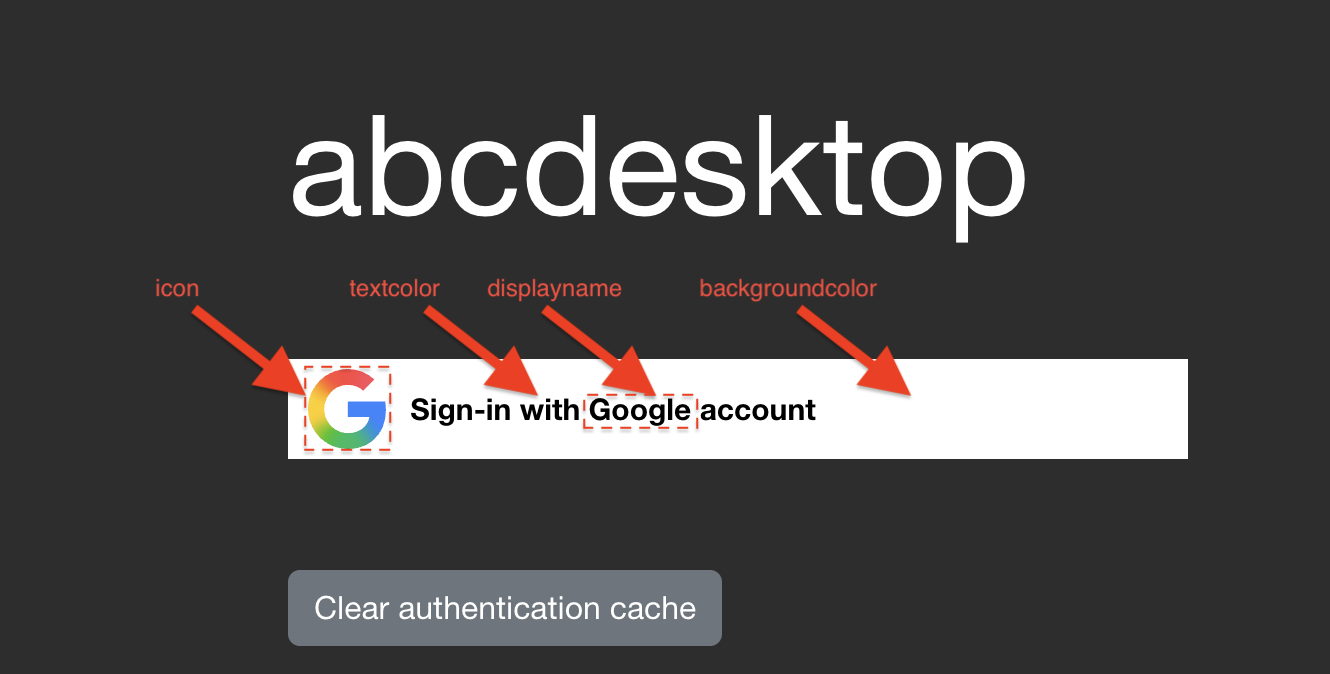
List of parameters
| Variable name | Type | Description | Sample |
|---|---|---|---|
displayname |
string | Display Name show in Web front | Google |
icon |
string | File name ogf the icon file. It must be in svg format |
'img/auth/google_icon.svg' |
textcolor |
string | text color for the front login page | '#000000' |
backgroundcolor |
string | background color for the front login page | '#FFFFFF' |
enabled |
boolean | enabled or diabled | True |
client_id |
string | client id | XXX-YYY.apps.googleusercontent.com |
client_secret |
string | client secret | XXX |
scope |
list of string | scope | [ 'https://www.googleapis.com/auth/userinfo.email', 'openid' ] |
userinfo_auth |
boolean | enable the OAuth userinfo request. The default value is True |
True |
userinfo_url |
string | dialog URL | `https://www.googleapis.com/oauth2/v1/userinfo' |
redirect_uri_prefix |
string | redirect URL | https://hostname.domain.local/API/auth/oauth |
redirect_uri_querystring |
string | URL query string | manager=external&provider=google |
authorization_base_url |
string | callback URL | https://accounts.google.com/o/oauth2/v2/auth |
token_url |
string | token URL | https://oauth2.googleapis.com/token |
userinfomap |
dictionary | remap key name to another one | { '*': '*', 'picture': 'picture.data.url' } |
policies |
dict | policies to allow or denied access, the default value is {} |
{ 'acl' : { 'permit': [ 'all' ] } } |
- The complete redirect url concats the two values
redirect_uri_prefixandredirect_uri_querystring. - The
userinfomapoverwites all previous values[ 'userid', 'name' ]and also values to build the posix account[ 'cn', 'uid', 'gid', 'uidNumber', 'gidNumber', 'homeDirectory', 'loginShell', 'description', 'groups', 'gecos'].
Read groups and set roles from userinfo
If userinfo_auth is True abcdesktop tries to read the json content from the userinfo_url request.
If the returned a json dictionary gets the groups entry and if the groups is list of string then the roles for the current user are defined with the groups content. All roles are set as labels tags on the user`s pod.
     if isinstance( userinfo.get('groups'), list ):
            for role in userinfo.get('groups'):
                if isinstance(role, str):
                    roles.append(role)
For example the getuserinfo returns a json like
{
    "id": "34567345623452",
    "email": "mail@yourdomain.com",
    "verified_email": true,
    "picture": "https://lh3.googleusercontent.com/x-/xxxxxxxxxxxx",
    "hd": "yourdomain.com",
    "groups": [ "admins", "developers" ]
}
Then the user pods gets the labels
kubectl describe pods user-746b8 -n abcdesktop
The labels list the admins and the developers
Labels:           abcdesktop/role=desktop
                  admins=true
                  developers=true
                  ...
Orange OAuth
Orange's OAuth is supported for authentication. This API is based on OpenID Connect, which combines end-user authentication with OAuth2 authorisation.
Orange Application
Create your Orange Application and set credentials for Orange Authentification API in the section
 'orange': {
        'displayname': 'Orange',
        'icon': 'img/auth/orange_icon.svg',
        'textcolor': '#000000',
        'backgroundcolor': '#FFFFFF',
        'enabled': True,
        'basic_auth': True,
        'userinfo_auth': True,
        'scope' : [ 'openid', 'form_filling' ],
        'client_id': 'xxxx',
        'client_secret': 'xxxx',
        'redirect_uri_prefix' : 'https://hostname.domain.local/API/auth/oauth',
        'redirect_uri_querystring': 'manager=external&provider=orange',
        'authorization_base_url': 'https://api.orange.com/openidconnect/fr/v1/authorize',
        'token_url': 'https://api.orange.com/openidconnect/fr/v1/token',
        'userinfo_url': 'https://api.orange.com/formfilling/fr/v1/userinfo',
        'policies': { 'acl'  : { 'permit': [ 'all' ] } }
      },
Facebook OAuth
Facebook's OAuth is supported for authentication.
Facebook Application
Create your Facebook Application credentials and set the credentials for Facebook Authentification API
'facebook': {
        'displayname': 'Facebook',
        'icon': 'img/auth/facebook_icon.svg',
        'textcolor': '#000000',
        'backgroundcolor': '#FFFFFF',
        'enabled': True,
        'userinfo_auth': True,
        'client_id': 'xxxx',
        'client_secret': 'xxxx',
        'redirect_uri_prefix' : 'https://ocv4.pepins.net/API/auth/oauth',
        'redirect_uri_querystring': 'manager=external&provider=facebook',
        'authorization_base_url': 'https://www.facebook.com/dialog/oauth',
        'userinfo_url': 'https://graph.facebook.com/v2.6/me?fields=picture.width(400),name',
        'token_url': 'https://graph.facebook.com/v2.3/oauth/access_token',
        'userinfomap': {
            '*': '*',
            'picture': 'picture.data.url'
        },
        'policies': { 'acl'  : { 'permit': [ 'all' ] } }
      }
The userinfomap rename the key of the userinfo json document. It translates the key name picture as the new key name picture.data.url.
Google OAuth
Google's OAuth is supported for authentication. The client_id is the google's OAuth client ID, and the client_secret is the OAuth client secret.
Google Application
Create your Google credentials and set the correct credentials for Google Authentification API in the section [gauth]
'google': {
        'icon': 'img/auth/google_icon.svg',
        'displayname': 'Google',
        'textcolor': '#000000',
        'backgroundcolor': '#FFFFFF',
        'enabled': True,
        'client_id': 'xxxx',
        'client_secret': 'xxxx',
        'userinfo_auth': True,
        'scope': [ 'https://www.googleapis.com/auth/userinfo.email',  'openid' ],
        'userinfo_url': 'https://www.googleapis.com/oauth2/v1/userinfo',
        'redirect_uri_prefix' : 'https://hostname.domain.local/API/auth/oauth',
        'redirect_uri_querystring': 'manager=external&provider=google',
        'authorization_base_url': 'https://accounts.google.com/o/oauth2/v2/auth',
        'token_url': 'https://oauth2.googleapis.com/token',
        'policies': {
          'acl': { 'permit': [ 'all' ] }
        }
      }
Github OAuth
GitHub's OAuth implementation supports the standard authorization code grant type and the OAuth 2.0 Device Authorization Grant for apps that don't have access to a web browser.
Github OAuth
Enable other users to authorize your OAuth App. Create your Github credentials here : authorizing-oauth-apps and set the correct credentials for Github Authentification API
'github': {
        'icon': 'img/auth/github_icon.svg',
        'textcolor': '#000000',
        'backgroundcolor': '#FFFFFF',
        'displayname': 'Github',
        'enabled': True,
        'basic_auth': True,
        'userinfo_auth': True,
        'scope' : [ 'read:user' ],
        'client_id': 'xxxx',
        'client_secret': 'xxxx',
        'redirect_uri_prefix' : 'https://hostname.domain.local/API/auth/oauth',
        'redirect_uri_querystring': 'manager=external&provider=github',
        'authorization_base_url': 'https://github.com/login/oauth/authorize',
        'token_url': 'https://github.com/login/oauth/access_token',
        'userinfo_url': 'https://api.github.com/user',
        'policies': { 'acl' : { 'permit': [ 'all' ] } },
        'userinfomap': {  'uidNumber': 'id' }
      }
Keycloak OAuth
Keycloak's OAuth implementation supports the standard authorization code grant type and the OAuth 2.0 Device Authorization Grant for apps that don't have access to a web browser.
Keycloak OAuth
Enable other users to authorize your OAuth App. Create your keycloack credentials and set the correct credentials for keycloak Authentification API
'keycloak': {
      'displayname': 'ABC Keycloak',
      'icon': 'img/auth/keycloak_icon.svg',
      'textcolor': '#000000',
      'backgroundcolor': '#FFFFFF',
      'enabled': True,
      'basic_auth': True,
      'userinfo_auth': True,
      'scope' : [ 'openid', 'roles', 'profile' ],
      'client_id': 'abcdesktop',
      'client_secret': 'xxxx',
      'redirect_uri_prefix' : 'https://hostname.domain.local/API/auth/oauth',
      'redirect_uri_querystring': 'manager=external&provider=keycloak',
      'authorization_base_url': 'https://auth.domain.local/realms/abc/protocol/openid-connect/auth',
      'token_url': 'https://auth.domain.local/realms/abc/protocol/openid-connect/token',
      'userinfo_url': 'https://auth.domain.local/realms/abc/protocol/openid-connect/userinfo',
      'revoke_url': 'https://auth.domain.local/realms/abc/protocol/openid-connect/revoke',
      'policies': { 'acl'  : { 'permit': [ 'all' ] }
    }
Great, you have check how the implicit Authentification configuration works.