Troubleshooting get nvidia GPU access to ephemeral container with CDI enabled
abcdesktop uses ephemeral container or pod as applications. nvidia adds support for Container Device Interface.
Apply runtimeClassName to abcdesktop config
Get the od.config file
If you don't already have the config file od.config, run the command line
kubectl -n abcdesktop get configmap abcdesktop-config -o jsonpath='{.data.od\.config}' > od.config
- Edit
od.configand update the dictionarydesktop.podto add'runtimeClassName':'nvidia'inspecand save your od.config file.
# THIS IS WHERE THE RESOURCES ARE ACTUALLY DEFINED FOR THE POD DESKTOP.
# Application execute class defined
executeclasses : {
    'default':{
      'nodeSelector':None,
      'description': 'default: up to 4 CPU cores and 8Gi',
      'runtimeClassName': None,
      'resources':{
        'requests':{'memory':'576Mi','cpu':'220m'},
        'limits':  {'memory':'8Gi','cpu':'4000m'}
      }
    },
    'bronze':{
      'nodeSelector':None,
      'runtimeClassName': None,
      'description': 'bronze: up to 2 CPU cores and 8Gi',
      'resources':{
        'requests':{'memory':'576Mi','cpu':'220m'},
        'limits':  {'memory':'8Gi','cpu':'2000m'}
      }
    },
    'silver':{
      'nodeSelector': None,
      'description': 'silver: 4 CPU cores and 32Gi RAM',
      'runtimeClassName': None,
      'resources':{
        'requests':{'memory':'2Gi','cpu':'2000m'},
        'limits':{'memory':'32Gi','cpu':'4000m'}
      }
    },
  'gold':{
    'nodeSelector':{'nvidia.com/gpu.present': 'true'},
    'description': 'gold: 4 CPU cores, 32Gi RAM and 1 GPU',
    'runtimeClassName': 'nvidia',
    'resources':{
      'requests':{'memory':"2Gi",'cpu':'4000m'},
      'limits':{'memory':"32Gi",'cpu':'4000m'}
    }
  },
  'platinum':{
    'nodeSelector':{'nvidia.com/gpu.present':'true'},
    'description': 'platinum: 8 CPU cores, 128G RAM and 1 GPU',
    'runtimeClassName': 'nvidia',
    'resources':{
      'requests':{'memory':'4Gi','cpu':'4000m'},
      'limits':{'memory':'128Gi','cpu':'8000m'} } } }

# features_permissions
# read executeclasses and permit a user to set a dedicated class name as desktop features
# 'read'   features_permissions is exposed to the frontend
# 'submit' features_permissions can be set to create a desktop
#
desktop.features_permissions : [ 'read', 'submit' ]
desktop.overwrite_environment_variable_for_application : "/composer/overwrite_environment_variable_for_application.sh"
- The
overwrite_environment_variable_for_application.shbash script runs into thegraphicalcontainer of the user`s pod.
gpu_uuid=$(nvidia-smi --query-gpu=gpu_uuid --format=csv,noheader)
# NVIDIA_VISIBLE_DEVICES is also know as k8s.device-plugin.nvidia.com/gpu
# define the variable named k8s.device-plugin.nvidia.com/gpu to the $gpu_uuid value
NVIDIA_GPU="{ \"k8s.device-plugin.nvidia.com/gpu\" : \"$gpu_uuid\" }"
It reads the gpu uuid, then set the variable NVIGIA_GPU to k8s.device-plugin.nvidia.com/gpu=$gpu_uuid
For example, when you run the overwrite_environment_variable_for_application.sh on a GPU host
echo $NVIDIA_GPU
{ "k8s.device-plugin.nvidia.com/gpu" : "GPU-42b94ea3-8e4b-7c2c-0f70-3f3efcdc27bb" }
A new application gets the env variable NVIDIA_VISIBLE_DEVICES from the bash script result. For example the echo $NVIDIA_VISIBLE_DEVICES inside another container return the same GPU-uuid
echo $NVIDIA_VISIBLE_DEVICES
GPU-42b94ea3-8e4b-7c2c-0f70-3f3efcdc27bb
Example of an ephemeral application sharing the GPU of the user's pod
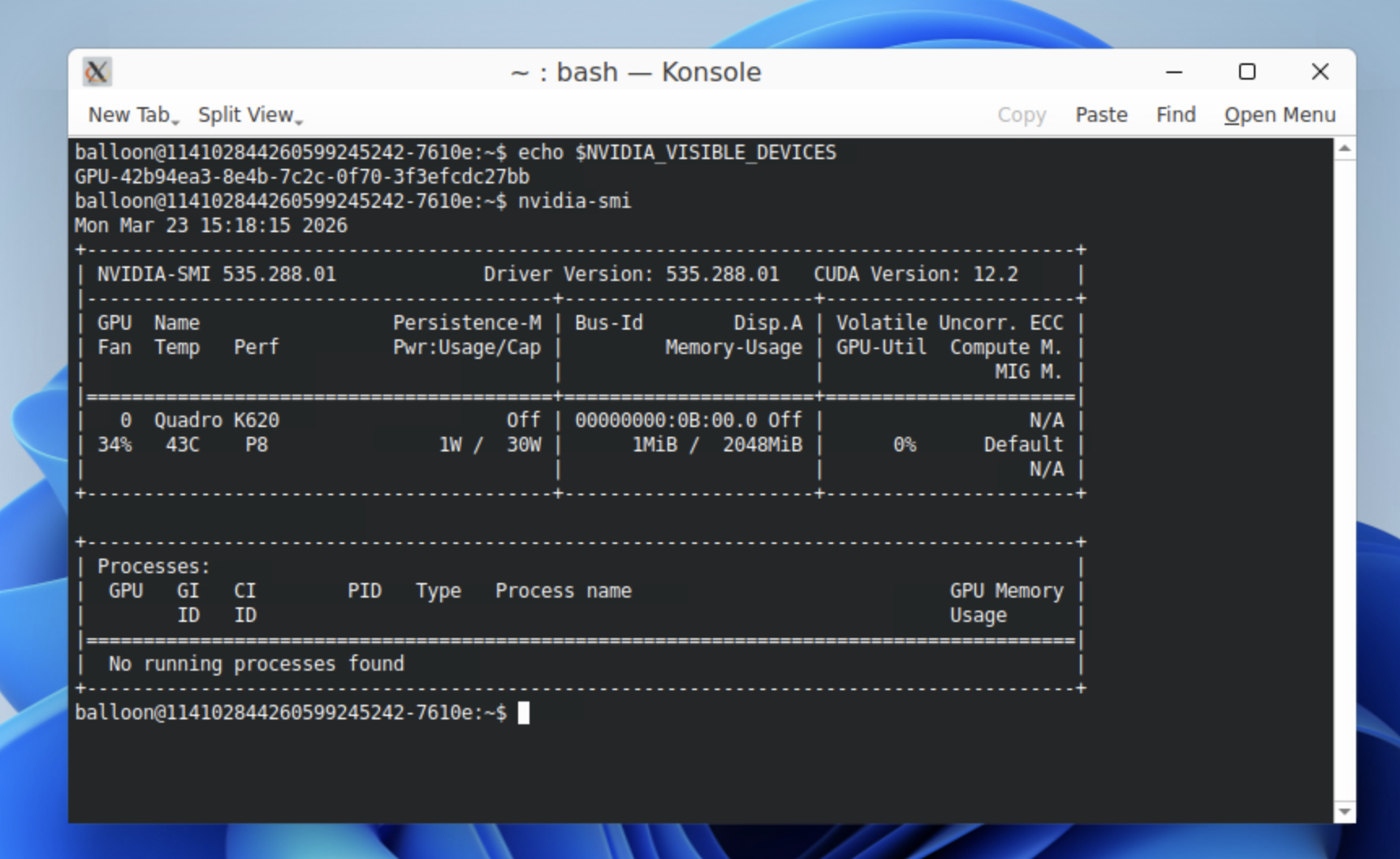
This screenshot shows the $NVIDIA_VISIBLE_DEVICES content and the nvidia-smi command result
- Update the configmap
abcdesktop-config
kubectl create -n abcdesktop configmap abcdesktop-config --from-file=od.config -o yaml --dry-run=client | kubectl replace -n abcdesktop -f -
- Restart deployment
pyos-od
kubectl rollout restart deployment pyos-od -n abcdesktop
- Create a new desktop pod to check the
runtimeClassName
kubectl get pods -l type=x11server -n abcdesktop
NAME        READY   STATUS    RESTARTS   AGE
fry-02f18   3/3     Running   0          24m
- Run comand lines into an ephemeral container
Start an application like firefox on web interface
Get pod description to read the ephemeral container name
kubectl describe pods fry-02f18 -n abcdesktop
The name of the ephemeral container is philip-j--fry-firefox-745f9
...
  Normal  Pulled     26m   kubelet            Container image "ghcr.io/abcdesktopio/firefox.d:4.3" already present on machine
  Normal  Created    26m   kubelet            Created container: philip-j--fry-firefox-745f9
  Normal  Started    26m   kubelet            Started container philip-j--fry-firefox-745f9
Execute some commands into this ephemeral container philip-j--fry-firefox-745f9 to check the GPU
kubectl exec -it fry-02f18 -c philip-j--fry-firefox-745f9 -n abcdesktop -- nvidia-smi -L
GPU 0: Quadro M620 (UUID: GPU-b5aebea9-8a25-fb21-631b-7e5da5a60ccb)
kubectl exec -it fry-02f18 -c philip-j--fry-firefox-745f9 -n abcdesktop -- ls -la /dev/dri
total 0
drwxr-xr-x 3 root root      100 janv. 13 15:05 .
drwxr-xr-x 6 root root      480 janv. 13 15:05 ..
drwxr-xr-x 2 root root       80 janv. 13 15:05 by-path
crw-rw-rw- 1 fry  fry  226,   1 janv. 13 15:05 card1
crw-rw-rw- 1 fry  fry  226, 128 janv. 13 15:05 renderD128
Links
- nvidia gpu-operator/23.6.2